

NEURONUP PROGRAMS
Plan months of intervention in just a few minutes with NeuronUP programs
Organize your patients’ long-term work, distribute sessions automatically, and track their progress from a single platform.
What is a NeuronUP program?
A NeuronUP program is a set of sessions organized to carry out an intervention over several weeks or months.
Programs let you set the work sequence, define the time available to complete each session, and schedule rest days between them.
This way, you can prepare a structured intervention in just a few minutes, assign it to one or more patients, and check how it is going without having to organize each session separately.
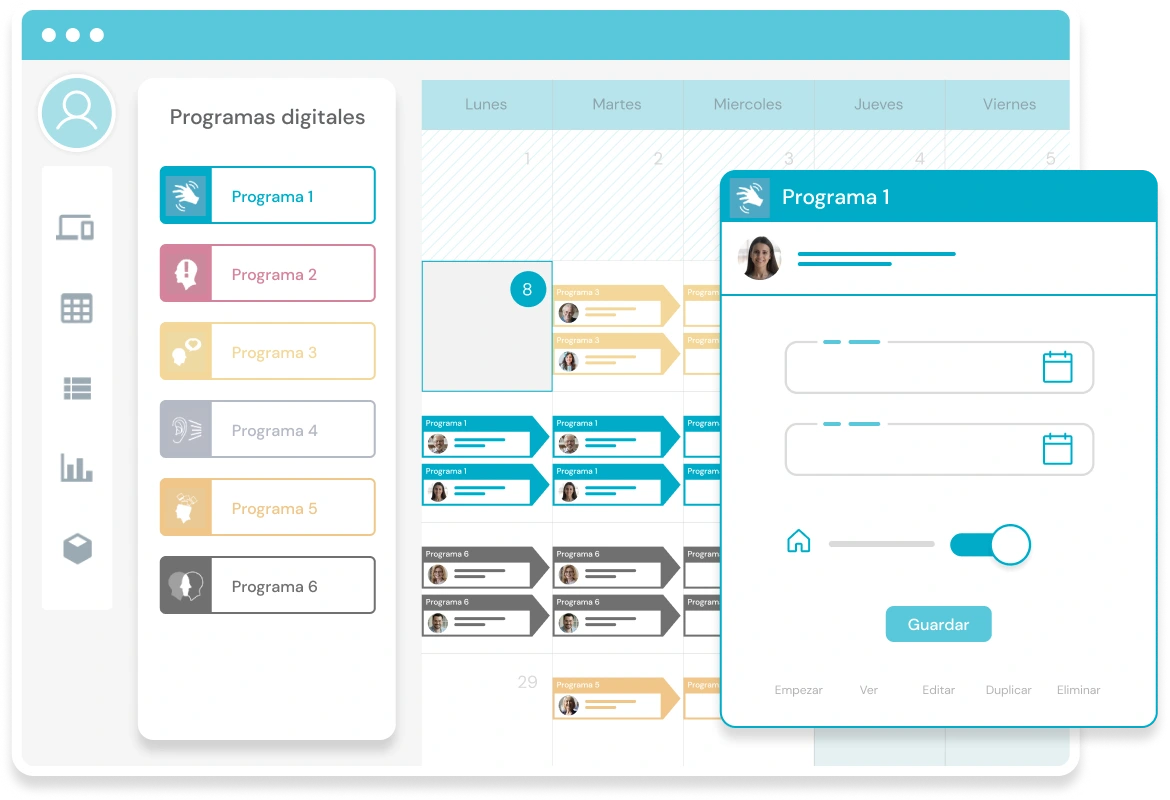
What can you achieve with NeuronUP programs?
Plan long-term and save time on organization
Organize a complete intervention for several weeks or months in just a few minutes. Bring the sessions together, set their order, and define the work pace so that NeuronUP distributes them according to the established plan. You can also reuse programs and view your entire schedule in the calendar or agenda view.
Keep the intervention continuous and structured
Long-term planning helps give continuity to the work done with each patient. You can define how many days they will have to complete a session and how many rest days there will be before the next one is activated, setting a work pace tailored to the goals of the intervention.
Assign a program to several patients
You can assign the same program to one or more patients at the same time, which is useful when several people share similar intervention goals. Even though the program is the same, each patient does the activities from their own profile and progresses according to their performance.
Adjust the difficulty to each patient’s progress
NeuronUP adapts the level of the activities to each person’s previous performance, so you can assign the same program to several people without manually setting the difficulty for each one. Each patient works at their own pace and at a level adjusted to their cognitive profile.
Adapt the intervention based on their results
Every time a patient completes a program session, their results are saved automatically to their profile. This lets you review their progress, detect changes, and adjust future sessions, goals, or planning without manually recording their performance.

Discover the advantages of creating
a program in NeuronUP
Programs allow you to organize a complete intervention lasting several weeks or months, distribute sessions according to the established plan, and track each patient’s progress from a single platform.
How do you create a digital program in NeuronUP?
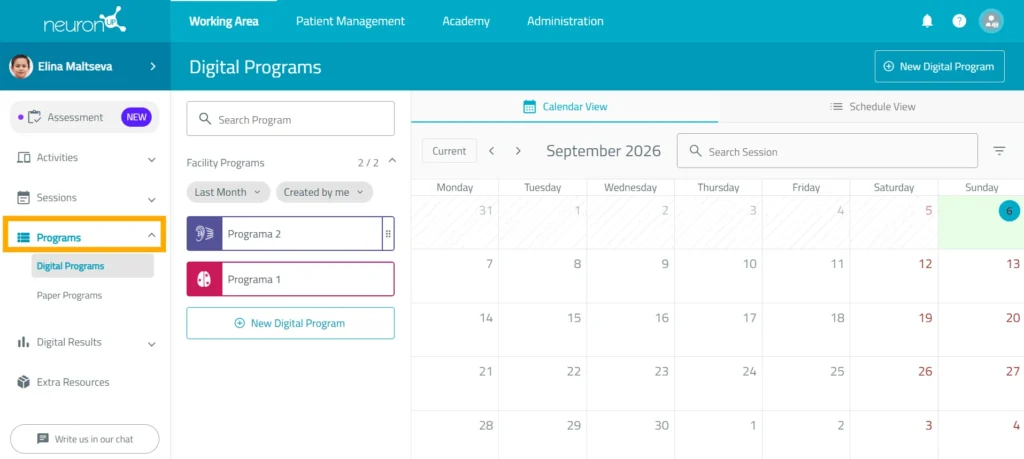
1. Go to “Digital programs”
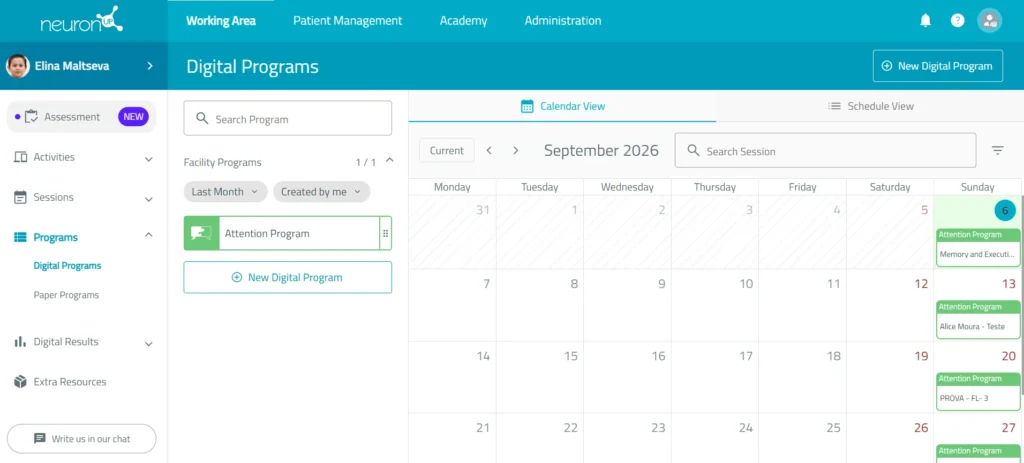
Go to the “Programs” section and select “Digital programs” from the menu on the left side of the platform.
From this screen, you can view your programs, review the ones already assigned, and create a new plan.
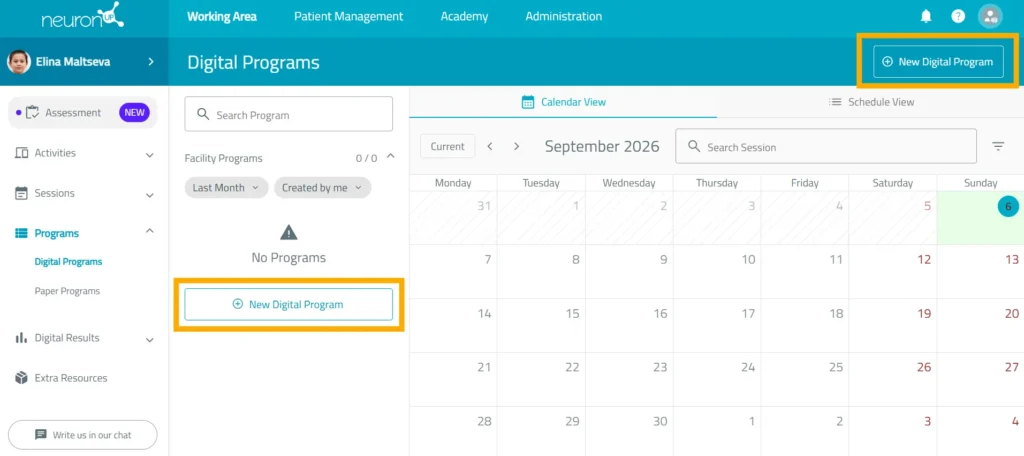
2. Click “New digital program”
Select the “New digital program” option to get started.
A window will then open where you can enter the program’s basic information.
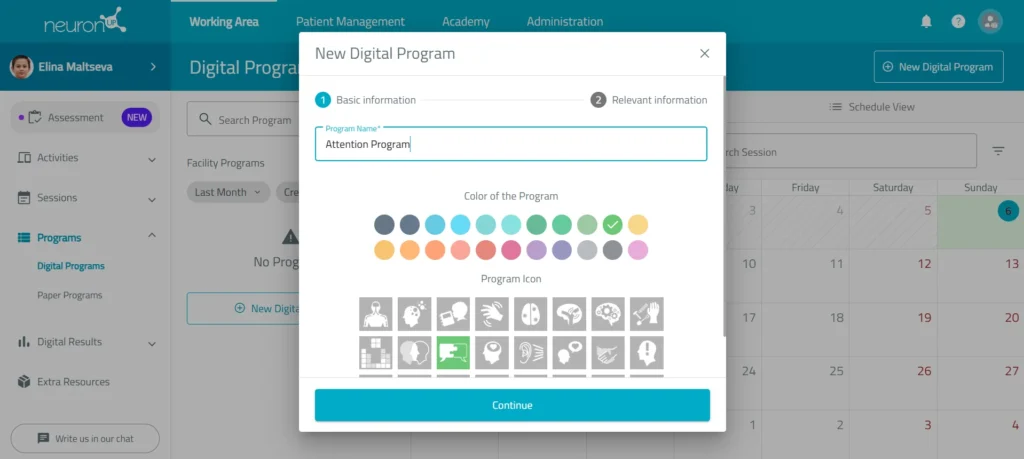
3. Fill in the program information
Add the details that will help you identify and organize the plan:
- Type the name of the program.
- Choose an icon.
- Select a color.
- Add a description and tags so you can find the program more easily.
- Turn advanced actions on or off.
- Click “Create”.
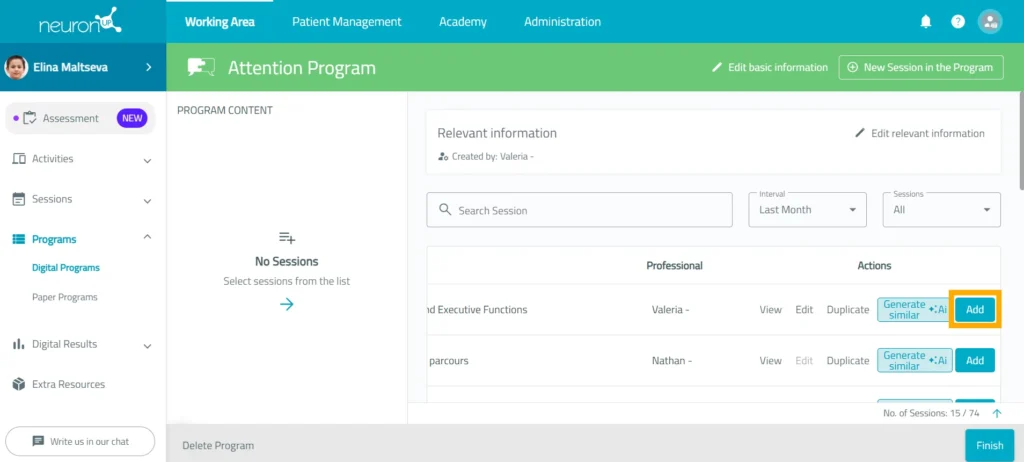
4. Add the sessions
Once the program structure has been created, select the sessions you want to include.
You can add previously created sessions and arrange them in the order in which they should be done. You can also generate sessions similar to ones you created before. Here we explain how to create a NeuronUP session.
The program will use this sequence to distribute the work over the established period.
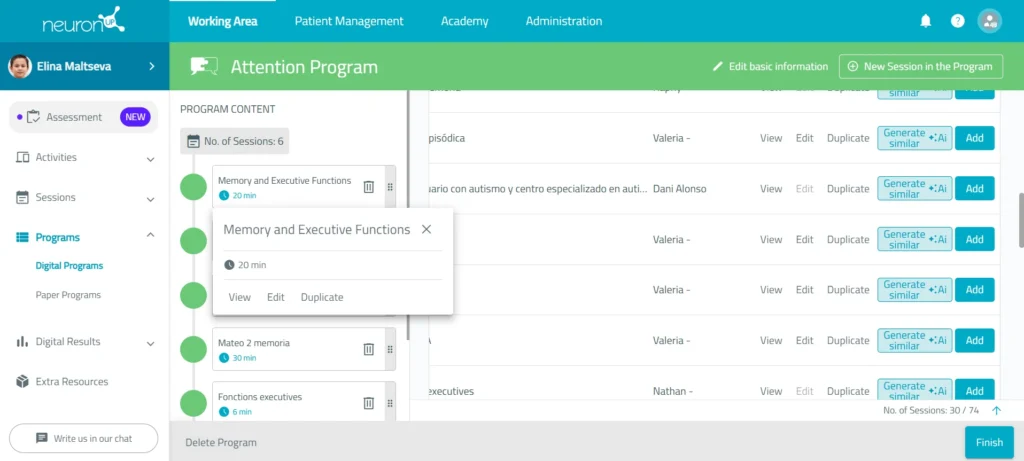
5. Configure the sessions
Check that the sessions are in the right order. You can configure or edit the sessions by clicking on each one.
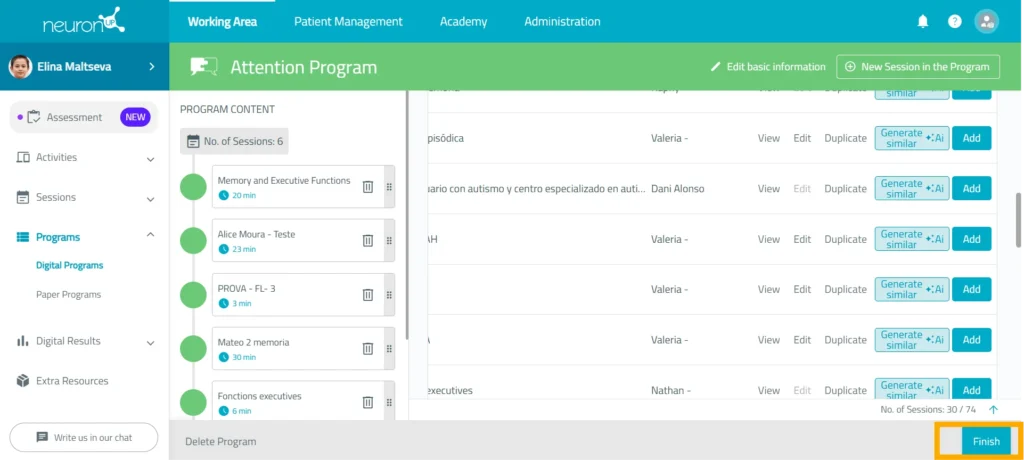
6. Save the program
When you have finished configuring it, click “Finish” at the bottom right of the screen.
The program will be saved, and you can edit it later if you need to modify the sessions, the organization, or the basic information.
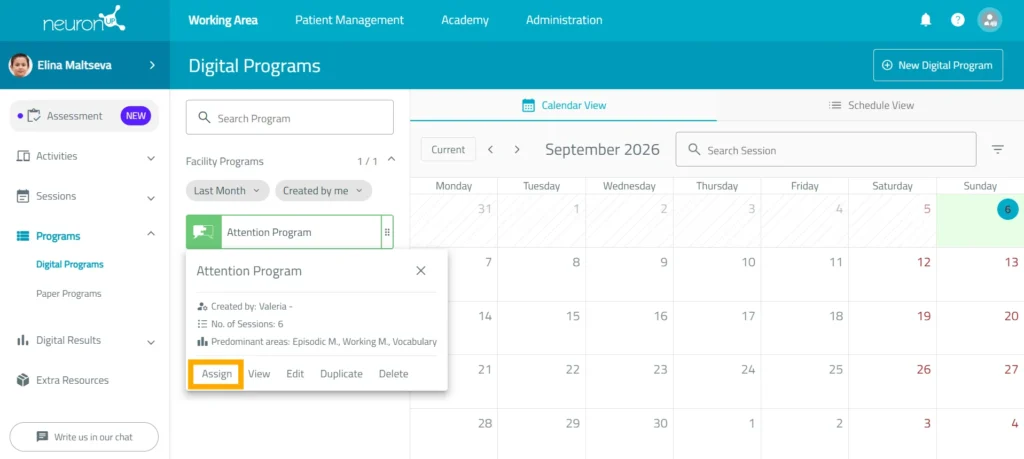
7. Assign and schedule the program
Click on the program and select “Assign”. You can also drag it directly to the calendar date on which you want it to start.
Next:
- Select one or more patients.
- Set the start date.
- Turn on the home program option when you want the work to be done remotely.
- Schedule the program: set the days of the week on which the sessions will take place, the work frequency, and the time the patient has to complete each session.
- Configure the session behavior.
- Confirm the program assignment.
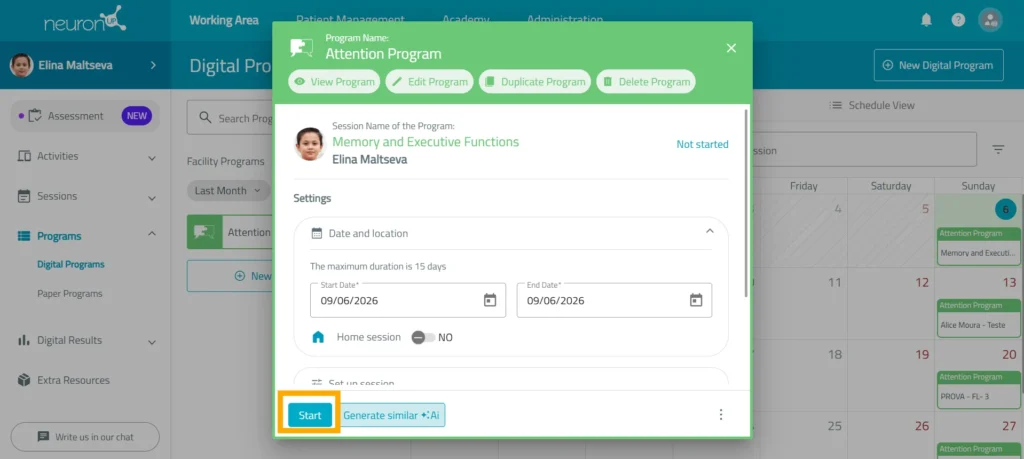
8. Start the program
To start a program, it must be assigned to a patient and be within the established date range.
Click “Start” on the first session of the program.
From then on, the patient can move forward following the defined plan.
9. Follow the program’s progress
Once started, you can check its progress using the indicator available on the platform.
You can also review the schedule from:
- The calendar view.
- The agenda view.
- The patient’s profile.
- The list of assigned programs.
These options let you check which sessions have been completed and which are still pending.
From the NeuronUP programs section, you can:
Learn more about
NeuronUP


Frequently asked questions
How long can a program last?
The duration depends on the number of sessions included, the days available to complete each one, and the rest periods set.
Can I set rest days between sessions?
Yes. When you create the program, you can define the number of rest days between one session and the next.
Can I assign a program to several patients?
Yes. You can select one or more patients when assigning the program. You can assign a program in two ways:
- From the calendar: drag the program to the day you want to do it. Once it is on the calendar, select the patient you want to assign it to.
- From the program itself: click on the program and select “Assign”. Then choose one or more patients.
Do all patients do the activities at the same level?
No. The platform adapts the level of the activities to each patient’s previous performance, so each person works according to their progress.
Can I change the sessions in a program?
Yes. You can edit the program to add, remove, or reorganize sessions before using it or whenever you need to adapt the plan. Simply click on the program and choose the “Edit” option.
Organize the coming months of intervention today
Create a structured plan, assign sessions, and automatically view your patients’ results from a single platform.