
DIGITAL RESULTS
Analyze your patients’ progress in real time with NeuronUP
Automatically view each patient’s performance, identify their progress, and use the results to adjust the intervention when needed.
What are NeuronUP digital results?
NeuronUP digital results show the performance of each patient in the activities, sessions, and programs completed on the platform.
Every time a patient completes a digital activity, the results are automatically recorded in their profile. This way, the professional can check their performance without manually transferring the information to other systems.
NeuronUP lets you analyze different types of results:
- NeuronUP Score: overall and by cognitive function.
- Activity results.
- Session results.
- Program results.
This information makes it easier to follow the patient’s progress and helps redefine the intervention based on their needs and progress.

Discover the benefits of analyzing results in NeuronUP
In this video, you will discover the advantages of accessing digital results, checking a patient’s performance, and analyzing their progress from different sections of the platform.
What can you achieve with NeuronUP results analysis?
View and record results automatically
Every time a patient completes a digital activity, session, or program, their results are updated and saved automatically to their profile. This way, you can check their performance in real time without entering data manually and spend less time on administrative tasks.
Save time when analyzing performance
NeuronUP brings together information about the activities completed and the patient’s progress in one place. You can view results by NeuronUP Score, activity, session, or program, depending on the level of detail you need, and focus on interpreting them and making decisions.
Analyze performance during activities
The indicators show not only the final result but also how the patient progressed during an activity: which phases they work on, how many exercises they pass, when the difficulty increases or decreases, and how they respond to changes in demand.
Interpret results and analyze progress
Analyze the Overall Score or the results by cognitive function using the progress line, the comparison with a reference population, the bar charts, and the impact of each cognitive function on the Overall Score. This way, you can detect improvements, difficulties, or changes and decide whether to adjust the intervention.
Deliver a continuous, structured intervention
Tracking results connects each intervention with the next one: the professional sets the activities, the patient completes them, NeuronUP records their performance, and the next step is planned based on that information.

Interventions based on
the patient’s progress
Results let you review each patient’s performance and use it as a starting point for the next intervention: adjust the difficulty, select new activities, reinforce certain areas, modify sessions or programs, and redefine goals.
This way, NeuronUP supports a continuous process: the professional plans, the patient does the activities, the platform records the results, and the next intervention is adapted based on them. Professional judgment remains essential to interpret the data.
Types of results available in NeuronUP
NeuronUP Score
NeuronUP Score is the score used to measure patients’ progress on the platform. It lets you compare each patient’s current results with their own previous results, both overall and in the different cognitive areas worked on.
It also includes charts comparing the patient’s performance with reference populations made up of people with similar characteristics, always subject to the professional’s interpretation.
Activity results
View the patient’s performance in specific activities:
 The activity completed and the date. The level or phase. The exercises passed, failed, and incomplete. The mistakes made. The activity completed and the date. The completion time and the observations.
The information available may vary depending on the type of activity.
Program results
They let you analyze the patient’s progress over an intervention made up of several sessions.
You can check how the program is going, the sessions completed, the pending ones, and the results obtained at each stage, which makes it easier to follow interventions planned over weeks or months.
Session results
They provide an overall view of the patient’s performance in a group of activities completed within the same intervention.
You can see which activities were part of the session, which ones were completed, and how the patient responded to each one, and identify which ones were most suitable or caused the most difficulty.
How do you view results in NeuronUP?
1. Go to “Digital results”
Log in to NeuronUP and select the “Digital results” section.
From this screen, you can view the different types of results recorded on the platform.
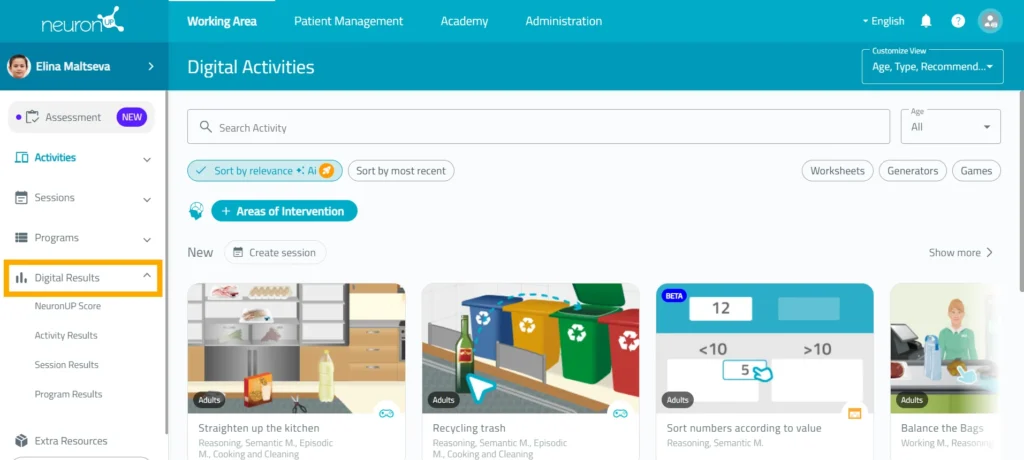
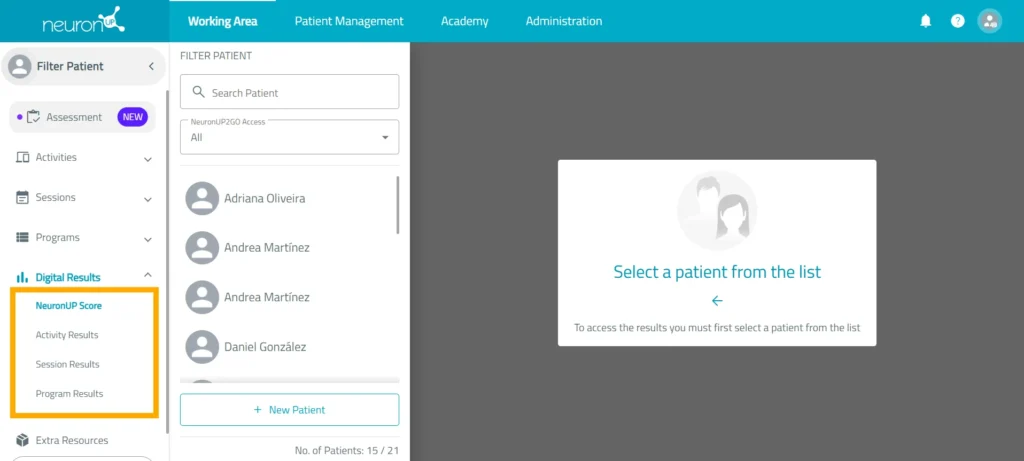
2. Select the type of result
Choose the section you want to analyze:
- NeuronUP Score.
- Activities.
- Sessions.
- Programs.
Each section offers a different perspective on the patient’s performance.
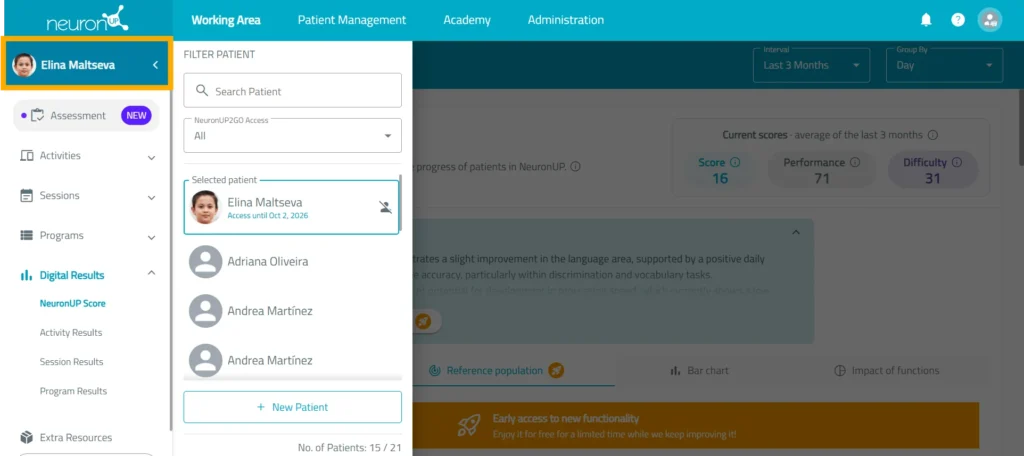
3. Select the patient
Search for and select the profile of the patient whose results you want to view.
The information shown will be linked to the activities, sessions, and programs completed from their profile.
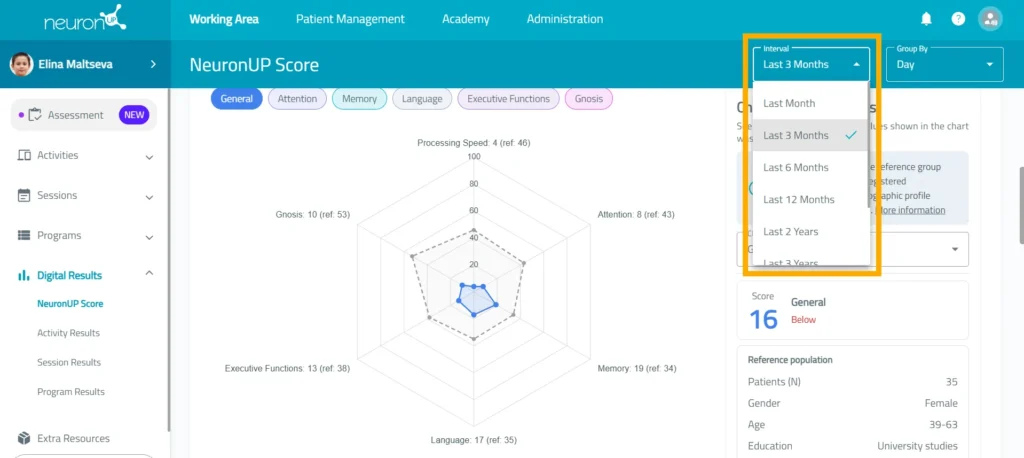
4. Adjust the time range
Select the period you want to view to display the corresponding results.
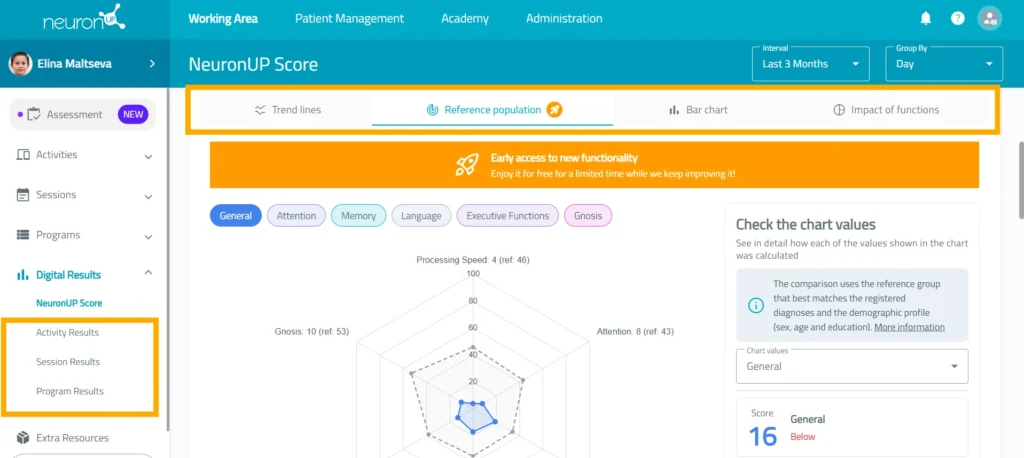
5. Review the charts and visual indicators
View the NeuronUP Score results through bar charts, comparisons with the reference population, and the impact on the different cognitive functions.
You can also analyze the patient’s performance in activities, sessions, and programs.
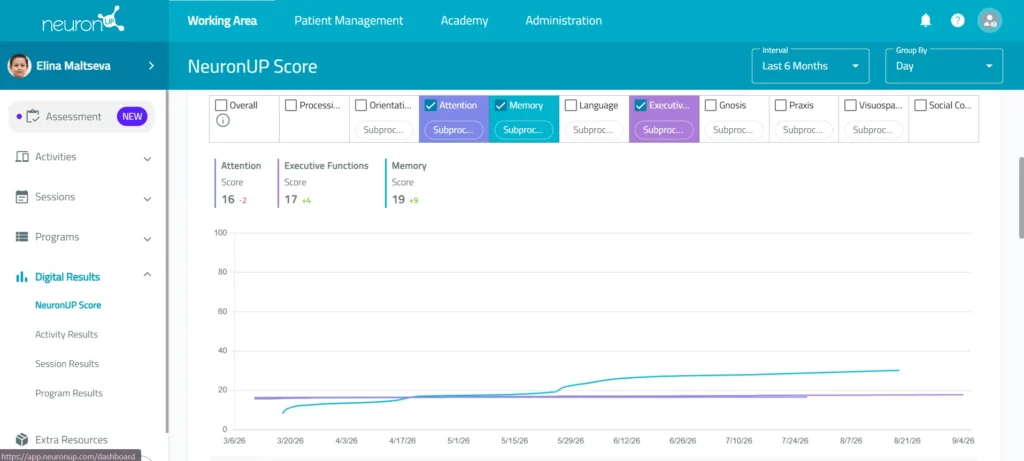
6. Analyze the progress
Compare results from different points in time to identify changes in performance.
See whether the patient is improving, maintaining their performance, or having difficulties in certain areas or activities.
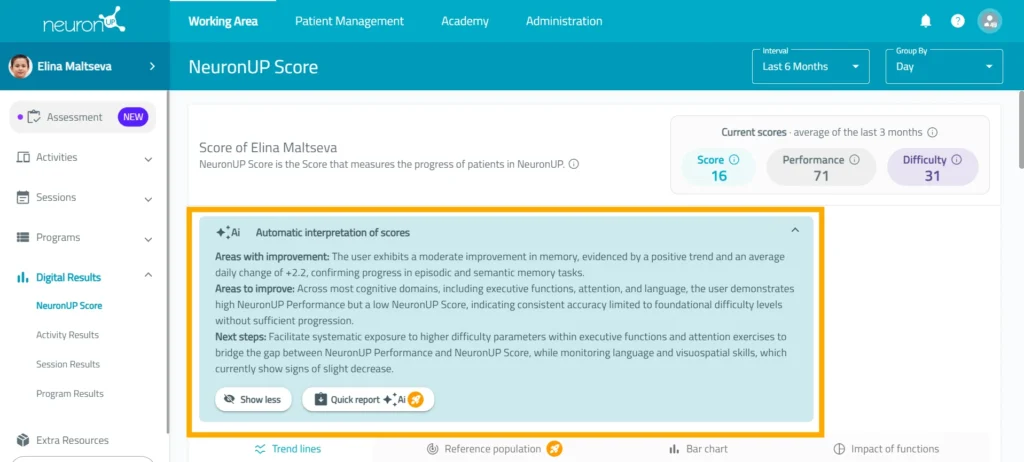
From the NeuronUP digital results section, you can:
Learn more about
NeuronUP


Frequently asked questions
What is the NeuronUP Score and what does it analyze?
It is a score that measures the patient’s progress by comparing their current results with their own previous results.
It lets you view overall progress and performance in the different cognitive areas worked on.
What is the difference between Score and Performance?
Performance reflects how the patient carried out the activities, taking into account their results without adjusting for difficulty.
The Score, on the other hand, takes into account the difficulty level reached, so it offers a more global measure of the patient’s ability and progress.
At an overall level, both values are calculated from the results obtained in the different cognitive functions, weighted according to the impact of each one.
What is Difficulty?
Difficulty indicates the average difficulty level of the cognitive functions the patient has worked on.
This metric reflects how demanding the activities completed were, regardless of whether the patient did better or worse on them.
Which indicators show the result of an exercise?
NeuronUP uses different indicators to represent the patient’s performance:
- Exercise passed: the patient completed the exercise correctly and without mistakes.
- Acceptable exercise: the patient completed the exercise but made some mistakes.
- Exercise failed: the patient did not manage to pass the exercise.
Can I see how each cognitive function influences the Overall Score?
Yes. NeuronUP shows the impact of each cognitive function on the Overall Score, indicating the percentage contribution of areas such as attention, memory, executive functions, orientation, language, processing speed, gnosis, praxis, and visuospatial skills.
You can also view the Score, Performance, and Difficulty for each function, which lets you analyze in more detail where the patient stands out, where they have the most difficulty, and how their performance is evolving.