
NEURONUP2GO
Continue cognitive rehabilitation remotely with NeuronUP2GO
Extend the intervention beyond the clinic, assign home sessions, and follow up with your patients remotely without losing personalization or control over their progress.
What is NeuronUP2GO?
NeuronUP2GO is the NeuronUP feature that allows your patients to do the sessions remotely that you have planned in advance.
As a professional, you can select the activities, adapt the intervention to each patient’s needs, and set when they should do it.
The patient logs in remotely with their own credentials and completes the activities on their device. Results are recorded automatically so you can review their performance and plan the next interventions.
In addition, the professional and the patient can leave messages within the sessions, making it easier to communicate, answer questions, and send instructions during remote work.

Discover the advantages of remote sessions with NeuronUP2GO
In this video, we show you the advantages of doing remote sessions with your patients.
What can you achieve with telerehabilitation in NeuronUP?
Keep the intervention going wherever the patient is
Your patients can keep working remotely to reinforce what was done in the clinic and maintain the intervention during vacations, illness, or periods when they cannot come to the center. It also makes access easier for people with mobility difficulties, transportation problems, or who live far away.
Personalize each patient’s work
Remote sessions are planned in advance by the professional. You can select activities based on the patient’s goals, needs, and cognitive profile, and adjust their settings before assigning them. This way, remote intervention keeps the personalization of the work done at the center.
Stay in touch during remote work
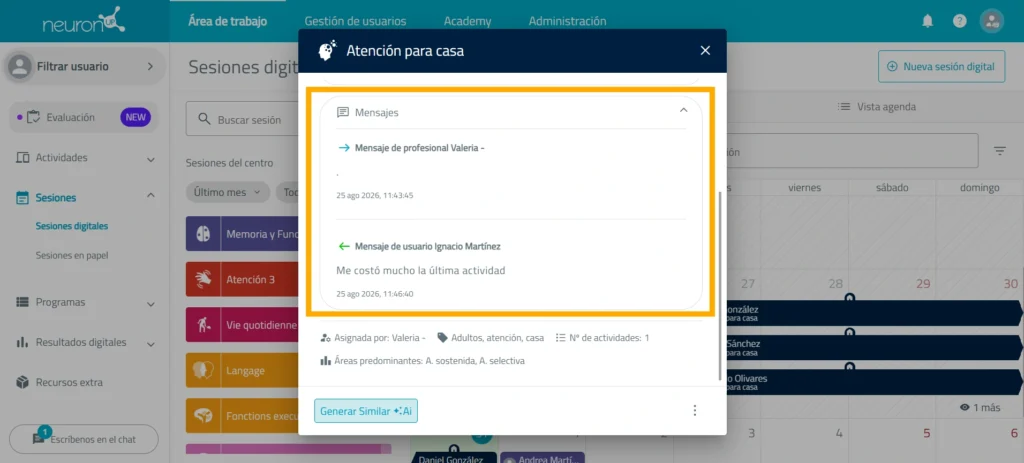
The professional and the patient can exchange messages within the sessions. This communication makes it possible to give instructions, answer questions, or provide information about the activities without losing track of the process, so the patient does not work completely on their own.
Review the results and adapt the intervention
Every time the patient completes a digital activity remotely, their results are recorded automatically in their profile. This way, you can review their performance, detect difficulties, and adjust the next activities or sessions, keeping continuous follow-up of both in-person and remote intervention.
Combine in-person
and remote intervention
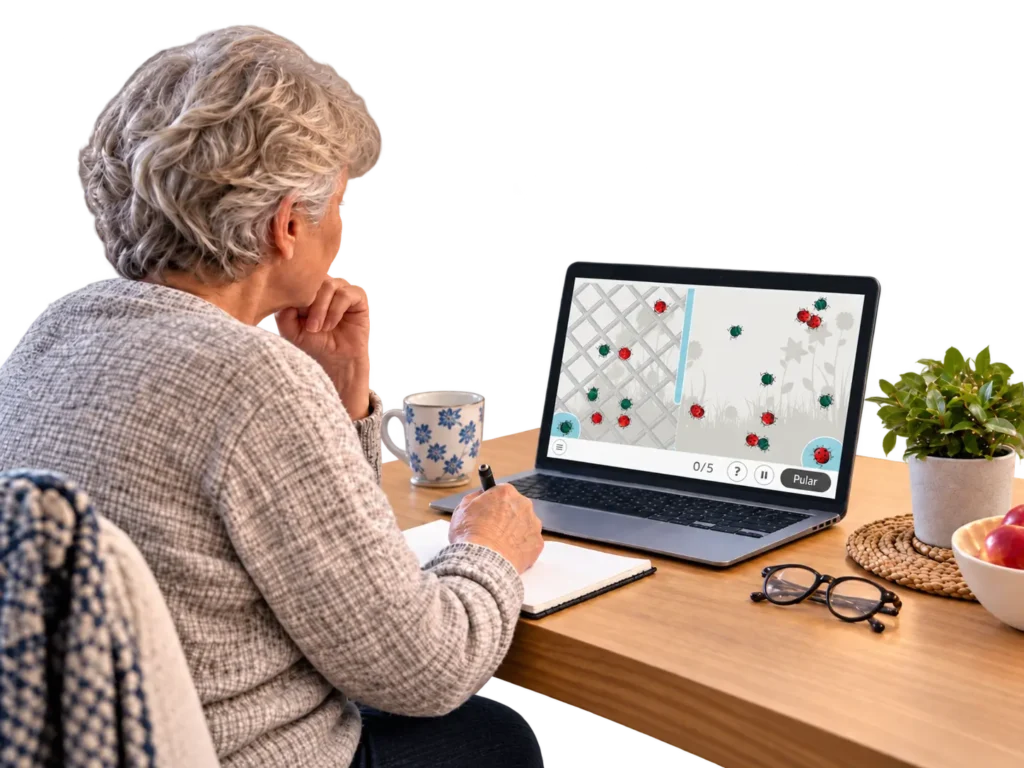
NeuronUP2GO does not have to replace the work done at the center. You can use remote sessions as a complement to in-person interventions and design a combined plan: at the center, you work directly with the patient and define the goals; remotely, the patient reinforces certain activities; and afterwards, you review the results to adapt the next intervention. Additional resource: the combination of in-person and online sessions at a neurorehabilitation center.
How does remote cognitive rehabilitation work with NeuronUP?
- Plan the session
- Assign the home session
- Share their login credentials
- The patient does the activities
- Stay in touch
- NeuronUP records the results
- Review their performance
- Plan the next intervention
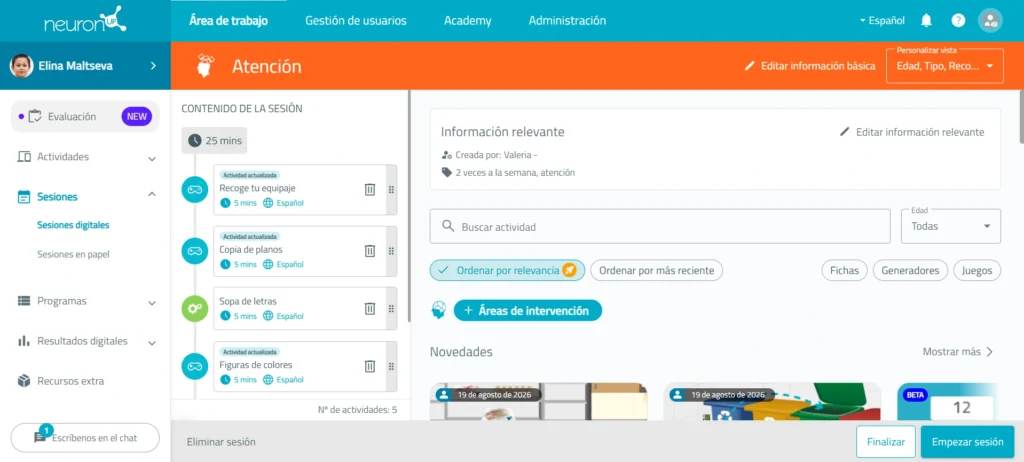
1. Plan the session
Select the activities you want the patient to do based on their needs, characteristics, and intervention goals.
You can create a new session or reuse and adapt an existing plan. Here we explain how to create a NeuronUP session.
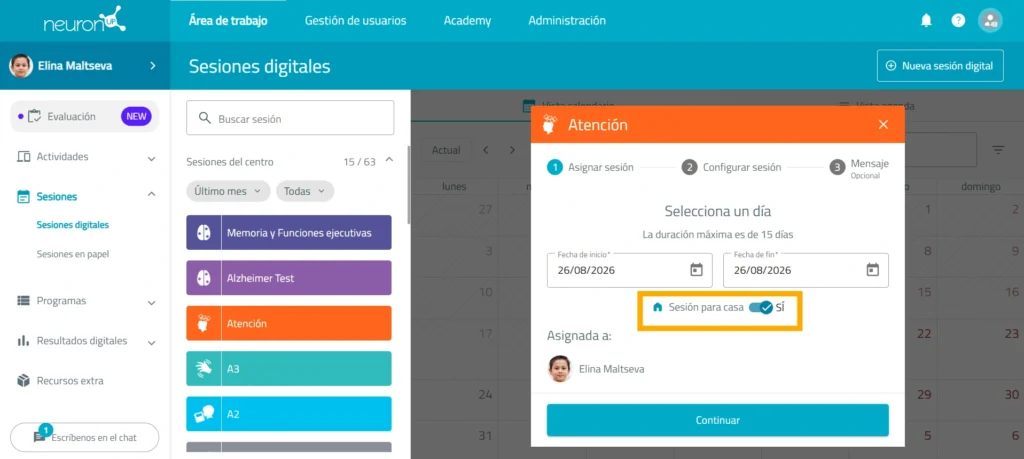
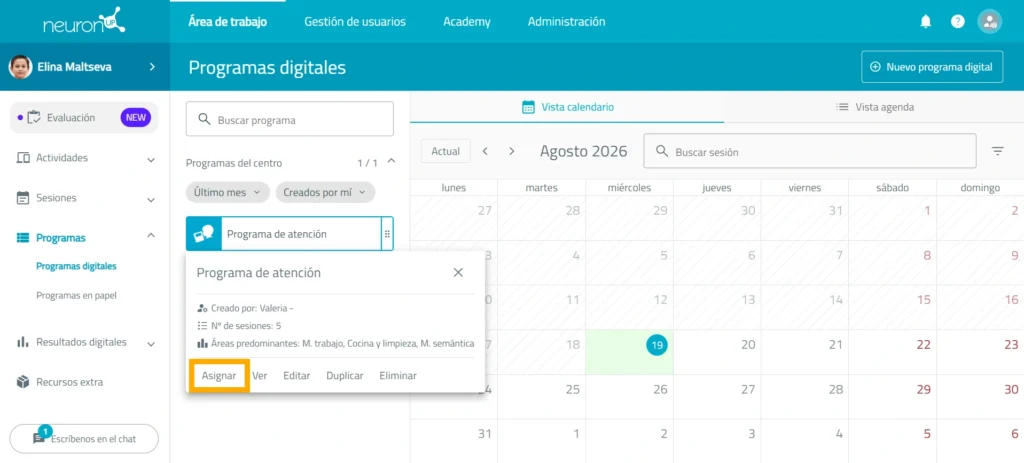
2. Assign the home session
Select the patient you want to send the session to and turn on the corresponding option so they can do it remotely.
Set the dates during which the work will be available, configure the session behavior, and leave a message for your patient.
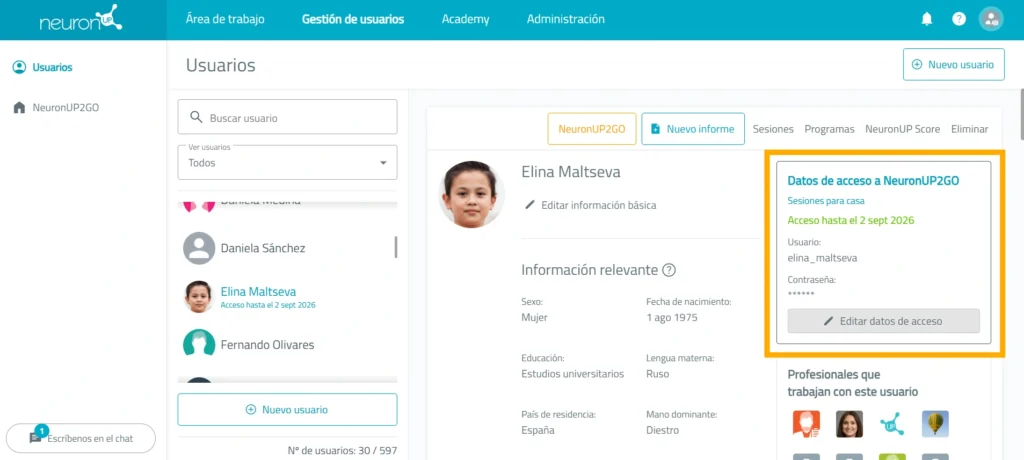
3. Share their login credentials
From the Patient management section, you can view each person’s username and password and change them to whatever you prefer.
Share these credentials with the patient so they can log in from their device.
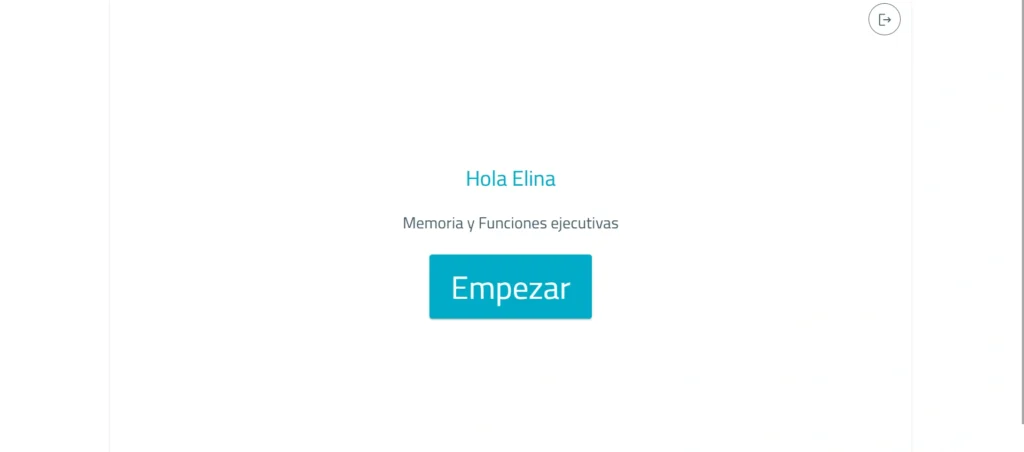
4. The patient does the activities
The patient logs in to NeuronUP with the shared credentials and, on the assigned days, goes directly to the session to do the activities selected in advance.
The session keeps the structure, settings, and goals defined by the professional.
5. Stay in touch
Patients can leave messages within the sessions to share questions, comments, or information about the work they have done. The professional can read these messages through their notifications when they log in to NeuronUP with their professional profile.
6. NeuronUP records the results automatically
The results of the digital activities done at home are automatically stored in the patient’s profile.
There is no need to manually enter their scores after each session.
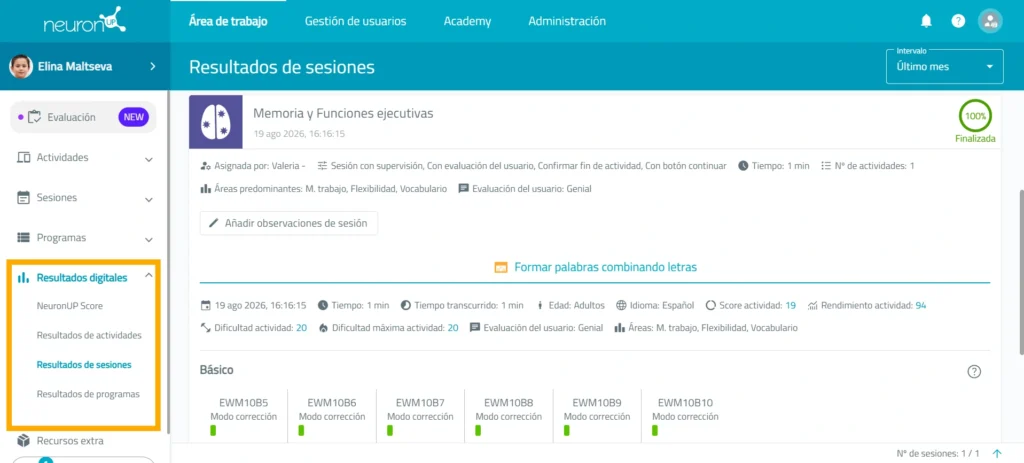
7. Review their performance
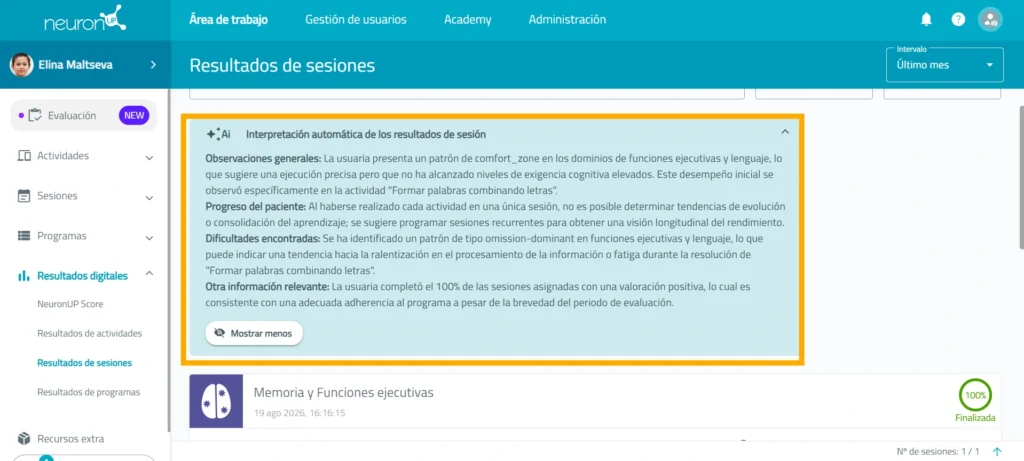
Check the results to see how the patient responded during the session.
You can analyze their performance and identify possible changes, improvements, or difficulties from the digital session results.
8. Plan the next intervention
Use the information from the automatic results interpretation panel to decide on the next steps.
You can keep the plan, modify the difficulty, select other activities, or reinforce certain goals.
The process starts again with a new session adapted to the patient’s progress.
What can you do with NeuronUP2GO?
Learn more about
NeuronUP


Frequently asked questions
How can my patient access NeuronUP2GO?
Before the patient can log in, you need to create and share their login credentials.
To do so, go to “Patient management”, select the patient, and find the “NeuronUP2GO login credentials” section. There you can set their username and password. Keep in mind that the username cannot contain spaces. In the following video, you can see step by step how to create each patient’s login credentials: https://youtu.be/76KLuw6l4OM
Once the credentials have been created, share them with the patient so they can access NeuronUP and log in with those details. In the following video, you can see step by step how a patient accesses a NeuronUP2GO session from home: https://youtu.be/wUlSpOYWdtM
How can I purchase NeuronUP2GO months?
You can do it from “Patient management” in two ways:
- Select the patient you want to assign NeuronUP2GO to and click the “NeuronUP2GO” button at the top. From there, you can purchase months or assign months you have already purchased.
- You can also go directly to the “NeuronUP2GO” section from “Patient management”, purchase the months you need, and then assign them to one or more patients.
In the following video, we show you step by step how to purchase NeuronUP2GO months: https://youtu.be/sAQWkTE86Hk
Are the results of home sessions saved automatically?
Yes. The results of the digital activities done through NeuronUP2GO are automatically recorded in the patient’s profile.
Can I see how the patient has worked from home?
Yes. You can review the results of the activities done at home and use that information to analyze their progress and adapt the next interventions.
Can the patient do any activity whenever they want?
No. The professional decides in advance which sessions will be available to the patient and during what period they can do them.