Find the right activity sooner and create sessions instantly
We’re launching the new activity list interface in NeuronUP, designed to make session preparation more agile, selection more precise, and use more recurrent (without losing clinical control).
What’s changing—and why it’s going to save you time
1. Smart ordering from the very first moment
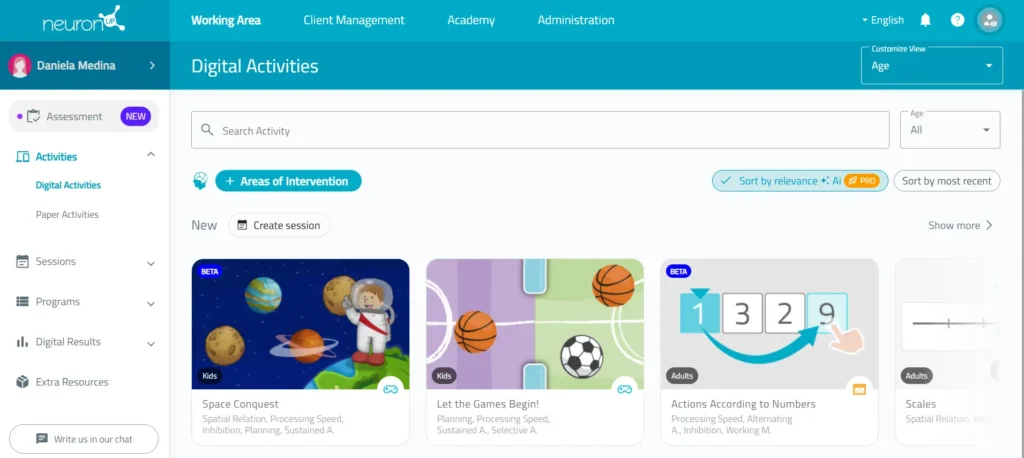
As soon as they enter, the user no longer encounters a “flat” list, but rather rows of activities selected automatically.
Each row displays a selection based on different criteria (usage, new releases, recommendations…), which reduces search time and makes decision-making easier.
In addition, these activities can be sorted:
- By relevance (smart order).
- By most recent.
2. Create sessions, integrated into the flow
Each of these rows includes the “Create session” action, which makes it possible to:
- Generate sessions directly from any activity block.
- Avoid unnecessary intermediate steps.
The interface doesn’t just display activities: it nudges you to use them in sessions.
3. Powerful, combinable filters
The user can apply any combination of filters (intervention areas, activity type, age, etc.).
By clicking “Show more”, they can access the full set of activities that meet those criteria, while always keeping the option to:
- Sort by relevance
- Sort by date
4. Clinically driven search criteria (real-life case)
Imagine a user with impairment in orientation and memory:
- You filter by those areas
- You sort by relevance for that user (filtered in the interface)
Result: the system automatically prioritizes the most suitable activities within the filtered pool.
Because not all activities are equally suitable, and the interface takes that into account.
5. Automatic generation of relevant sessions
From “Activities found,” with one click on “Create session”, the system automatically generates a session with the 6 most relevant activities after filtering.
This turns the interface into more than a catalog: it suggests, prioritizes, and takes action.
6. Direct impact on your day-to-day use
Overall, the new interface:
- Reduces session preparation time
- Improves the quality of selected activities
- Encourages recurrent use of sessions (not just standalone activities)
In summary
The new interface isn’t just a visual redesign. It’s a professional decision-making tool that organizes, recommends, and streamlines session creation in a smart, contextual way.










Leave a Reply